Q4 2025: New Permissions and Triggers
1) New User Permissions and Sections
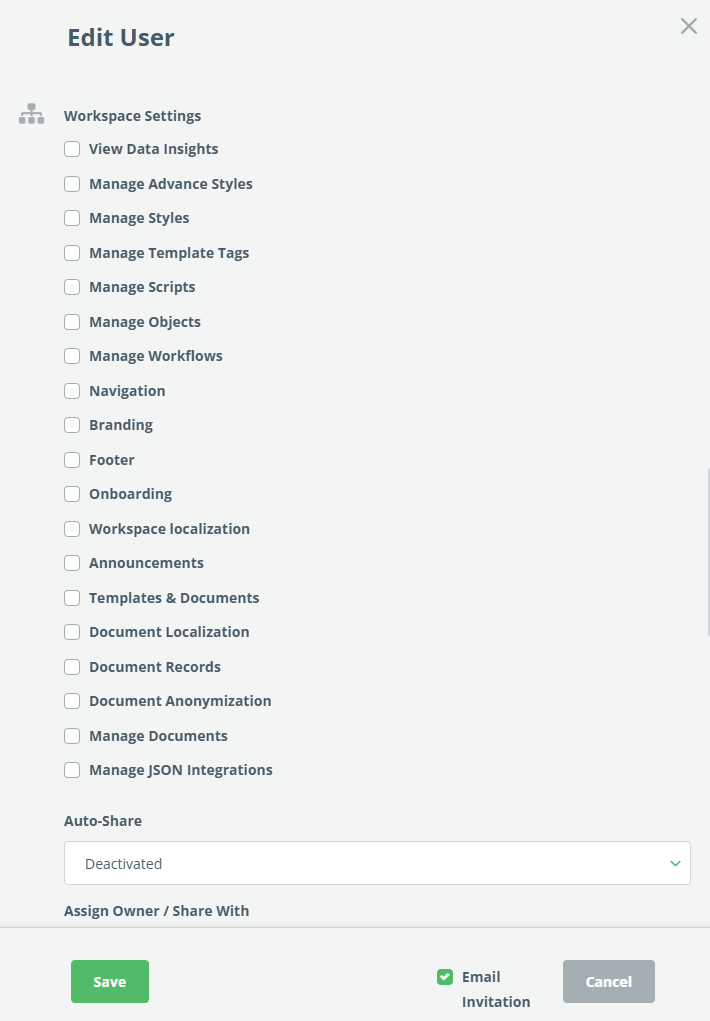
Several new user permissions have been added to control access to sections in the Workspace Settings, which were historically reserved for workspace admins only. New user permissions can be found in People -> Users -> Edit. The newly added permissions are for the following categories:
- Navigation
- Branding
- Footer
- Onboarding
- Workspace Localization
- Announcements
- Template & Documents Grouping
- Document Localization
- Document Records
- Document Anonymization
- Manage Documents
The User Permissions window has been redesigned for easier access to the following 5 new sections:
- Workspace Settings
- Document Export
- Document Automation
- Document Lifecycle Management
- Signatures
2) New Template Suites Permissions
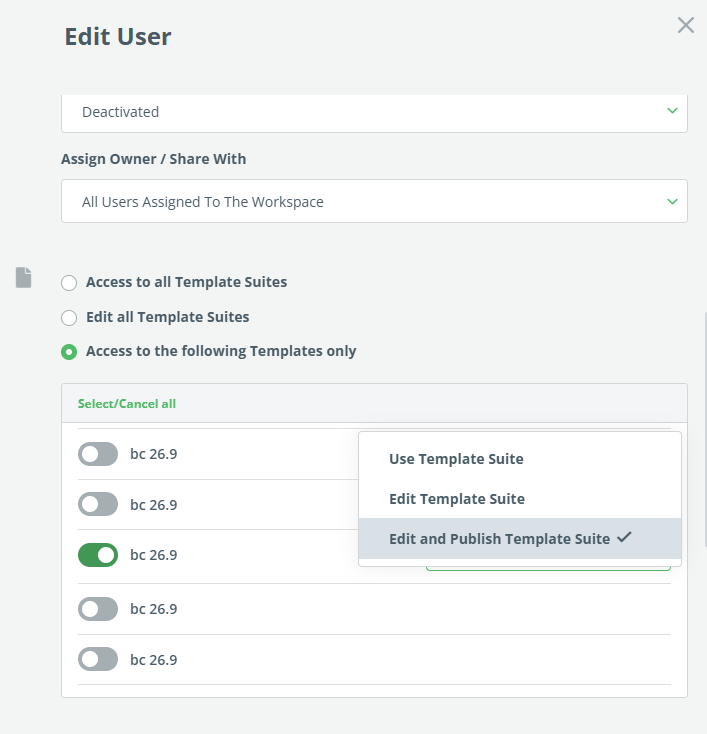
Permissions for editing Template Suites are now divided into the following two options:
- Edit Template Suite – users can create documents and also edit and save templates, but are not allowed to publish new versions of Templates (the Publish button in the Template Editor is hidden).
- Edit and Publish Template Suite – the user can do everything described above, plus publish new versions of templates.
This change applies to individual templates, but also categories and countries.
3) Editable Rows in Templates Section
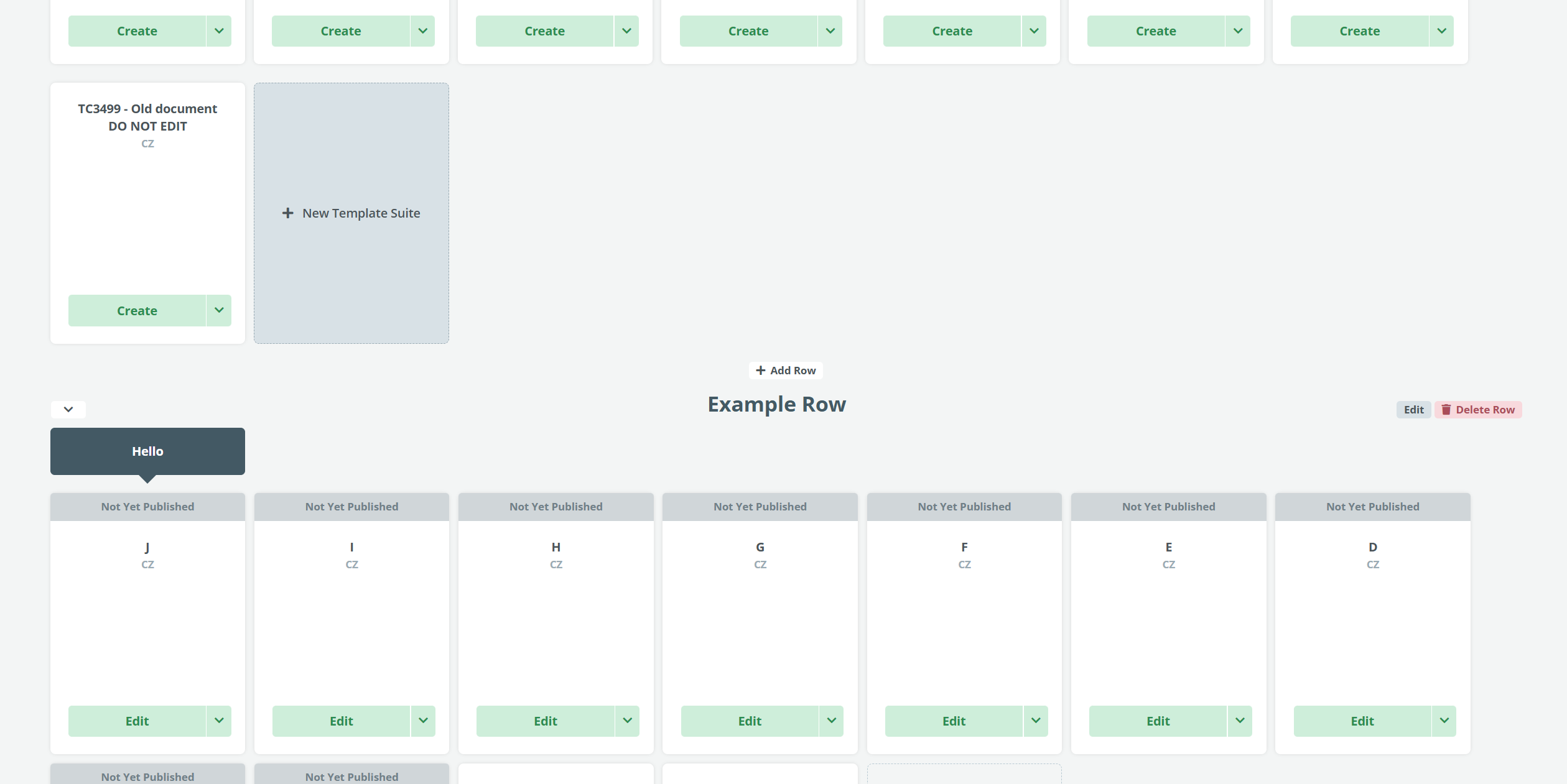
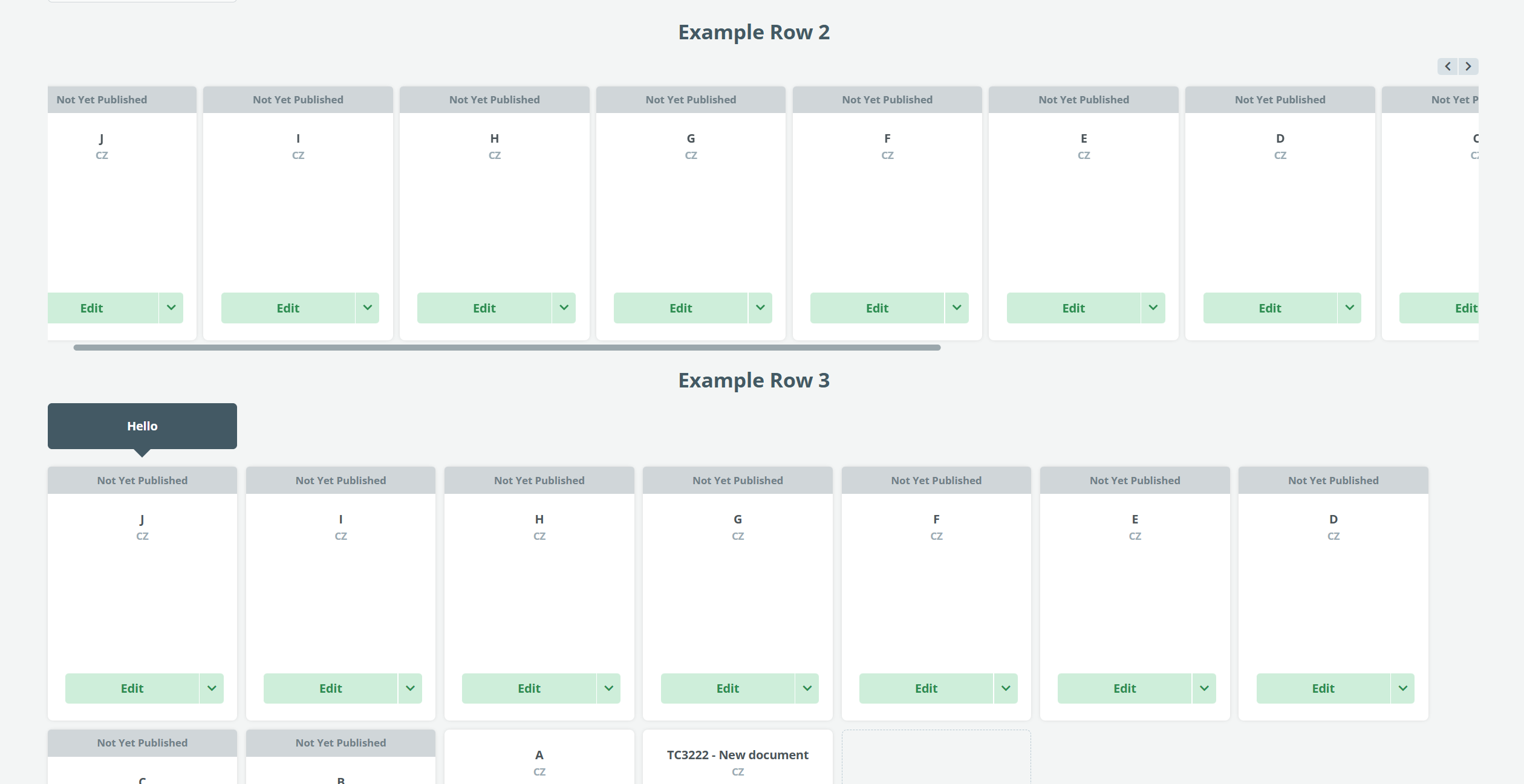
Similar to the dashboard, it is now possible to divide the Templates section into rows.
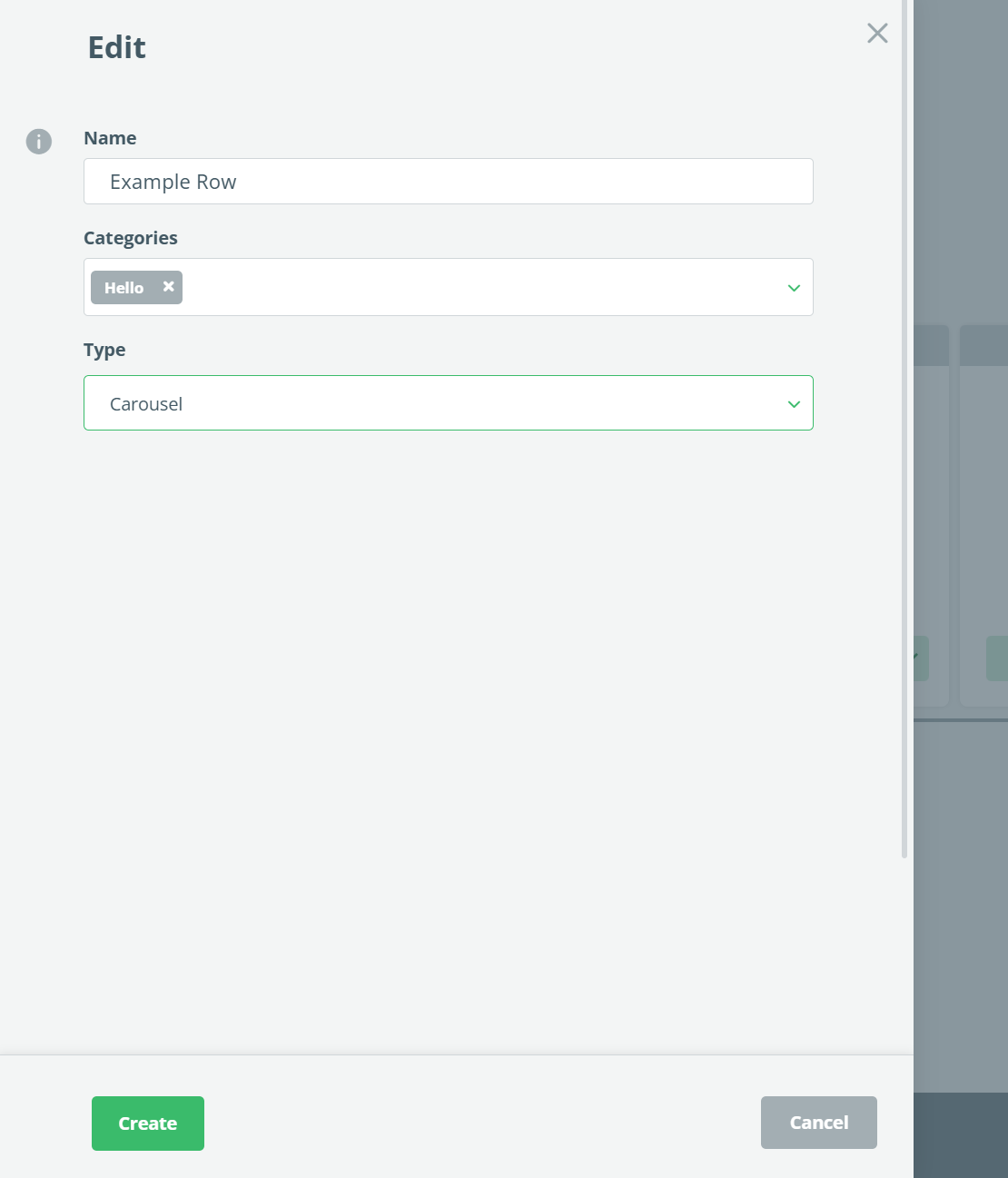
One or more Template Categories can be displayed in each Row. Each Row has a customizable title and layout (tiles or carousel).
Only one of the Templates section layouts can be applied for all users in the Workspace. Only the Workspace Admin can edit the layout.
To edit the layout, go to the Template section, click on the Actions button, and choose Edit item. Changes to Template section layout are saved automatically.
To add a new Row, click the “Add Row” button at the bottom of the page. Existing Row may be reordered or deleted.
Automatically simplified view for less than 10 Templates, and the Search view is not affected by this feature.
Filters are also applicable to the Rows.
The View for Templates not assigned to any Category, or are assigned to a Category that is not used in any Row will not change.
4) Clause Library Clause name is visible in the Template
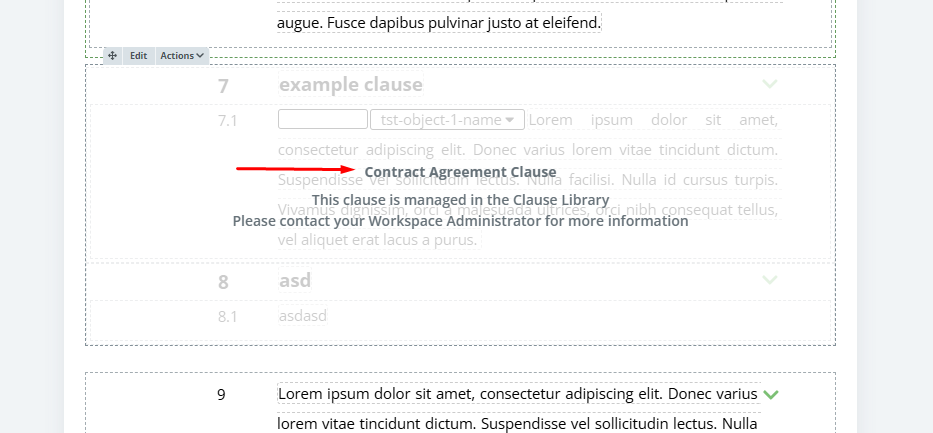
Hovering over an added Clause Library Clause now displays its name. This is especially helpful when working with large templates containing multiple similar Clause Library Clauses.
5) Improvements to the Merging Template Updates
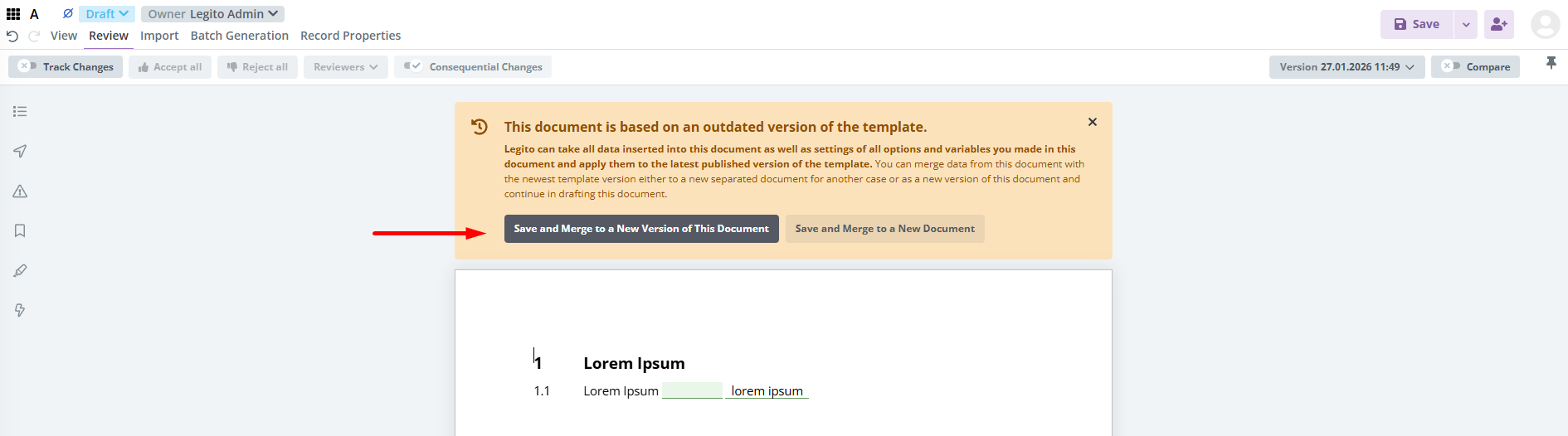
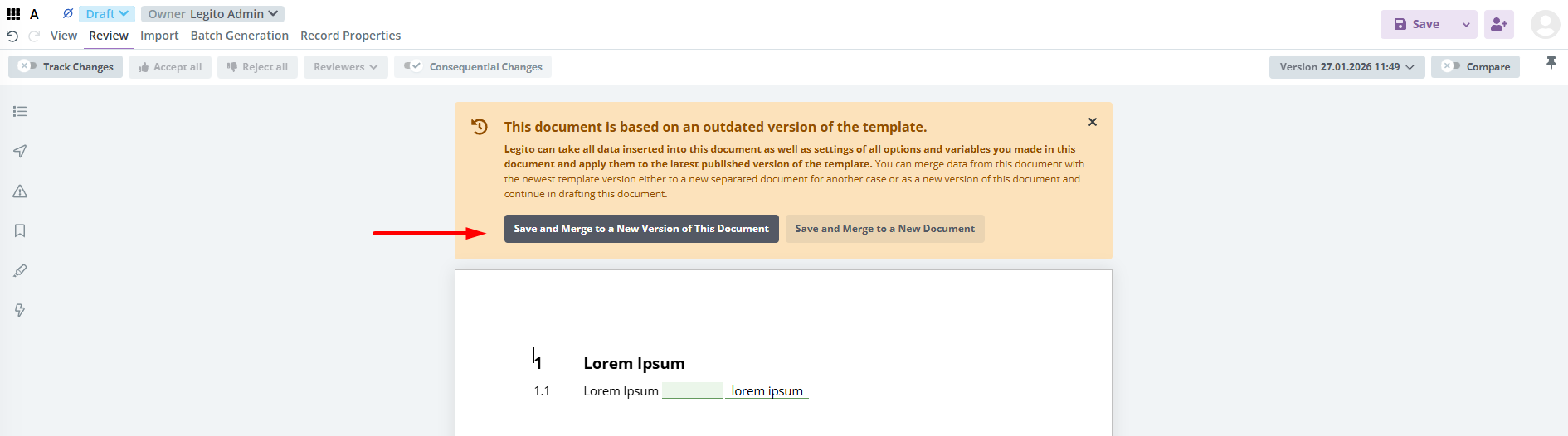
Merging a document with a new Template Suite Version also saves the user edit made before clicking the Merge button. The panel was also redesigned.
6) Additional Anonymization Options
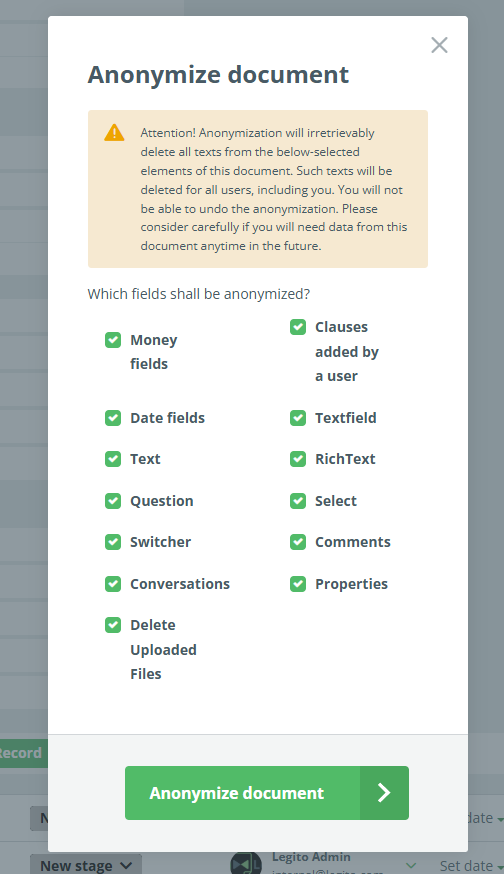
Legito now supports the anonymization of several additional Template Suite elements and related Document Record data. When setting up anonymization, users can now select these options:
- Question Element
- Select Element
- Switcher Element
- Comments in the Document
- Conversation (chat) attached to the Document Record
- Document Record Properties
- Uploaded Files
7) Template Editor Tooltips
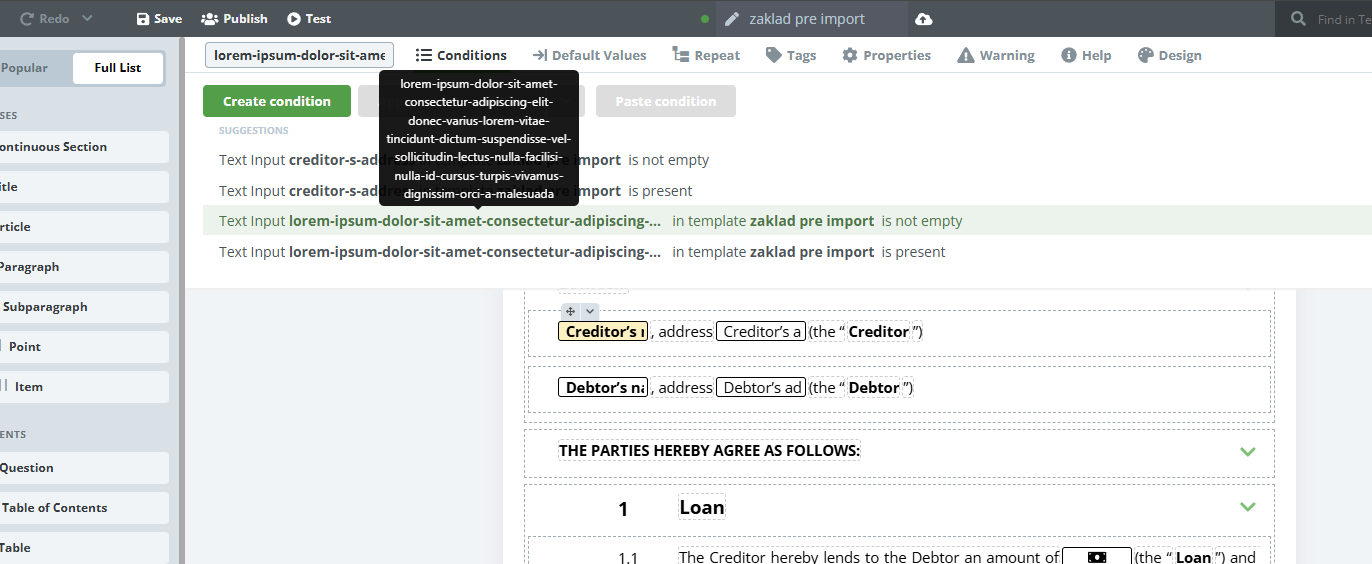
Tooltips have been added to show the full name of user-defined values, such as system names or options in questions and selects. These tooltips will appear in the Template Editor when hovering the cursor over items in conditions, repeats, default values, etc. This is especially useful for long texts.
8) Customizable Workflow Stage for Activation of Push API Connections
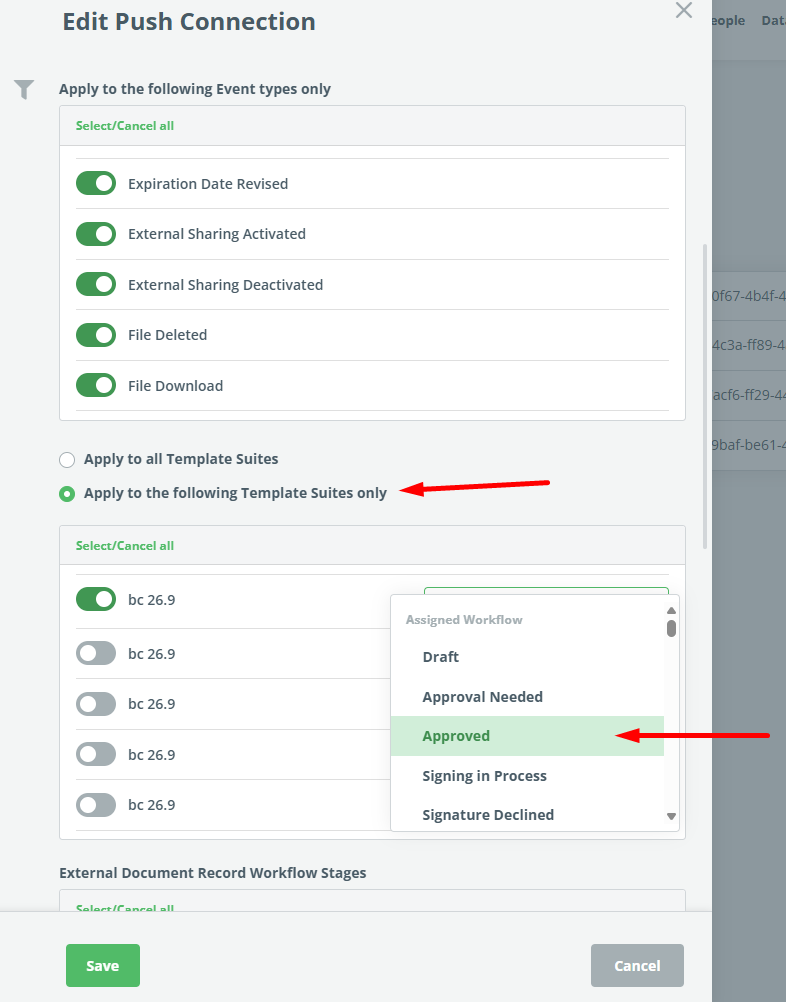
The existing Template Suite settings for activation of Push API connections are enhanced with Workflow Stages for each Template Suite. The Push API connection is triggered if a Document Record containing a Document from the Template Suite is in the selected Workflow Stages.
Document Records without automated Documents have one Workflow Stage setting in the Push API Connection details.
By default, all stages are active.
9) Deletion of Document Records from Archive
Trash was renamed Archive, and subsequently, the former Delete button is now Archive.
Also, we added the possibility of irretrievably deleting Document Records from Archive (formerly Trash). When deleted, the Document Record will be unavailable to the users, and such a data deletion will be done in the full scope of the Anonymization.
10) Automatic Delete and Archive for Document Records
Now you can set automatic deletion and automatic archiving of Document Records after a defined number of days since any of the following events
- Document Created
- Document Modified
- Document Last Active
- Document Archived (for deletion only)
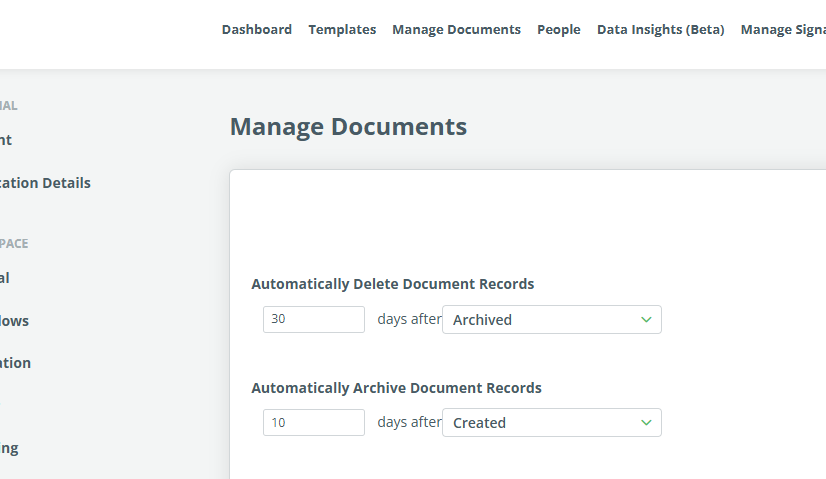
The archiving and deleting are deactivated by default.
11) Customizable Defaults for View Tab in Document Editor
Customization was added to the View tab items in the Document Editor.
Each item in each Template Suite Layout can be configured separately. Users can now choose one of these three available options:
- Active
- Deactivated
- Hidden
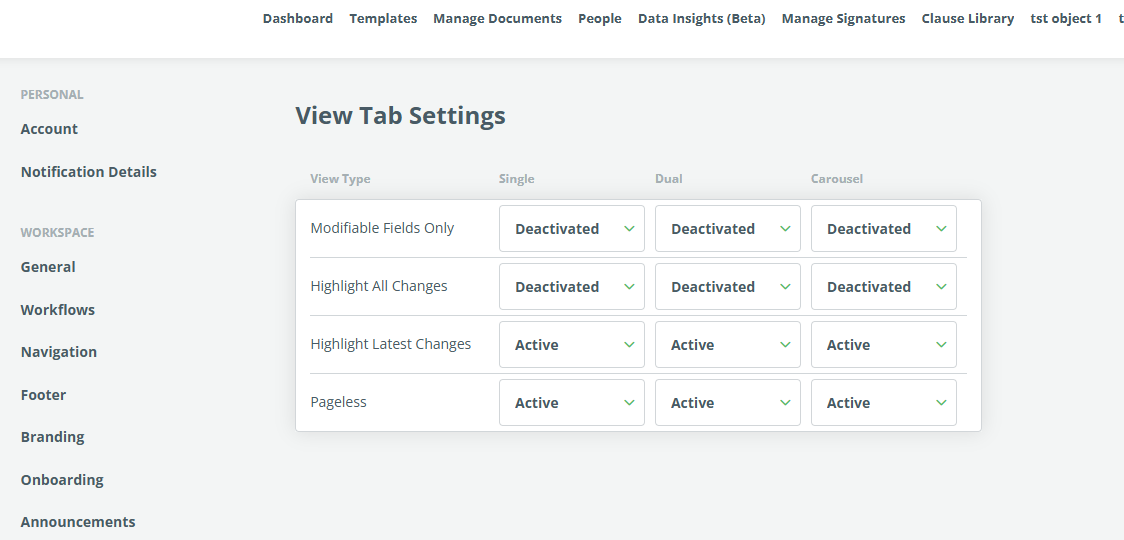
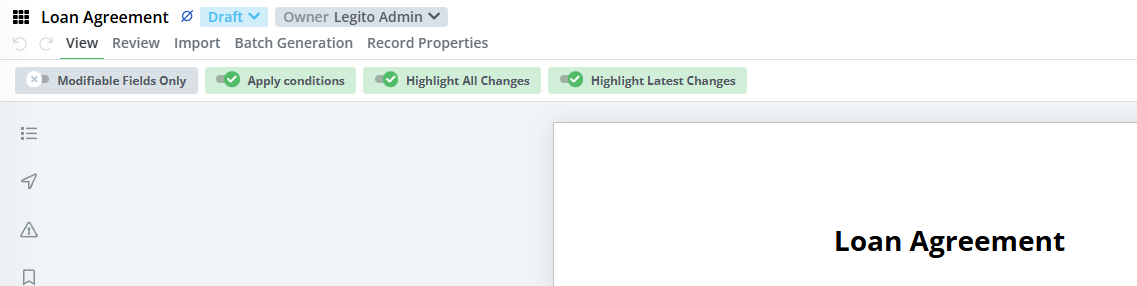
The settings are available for Workspace admins only, and are located in the newly added Document Editor section in the Workspace Settings.
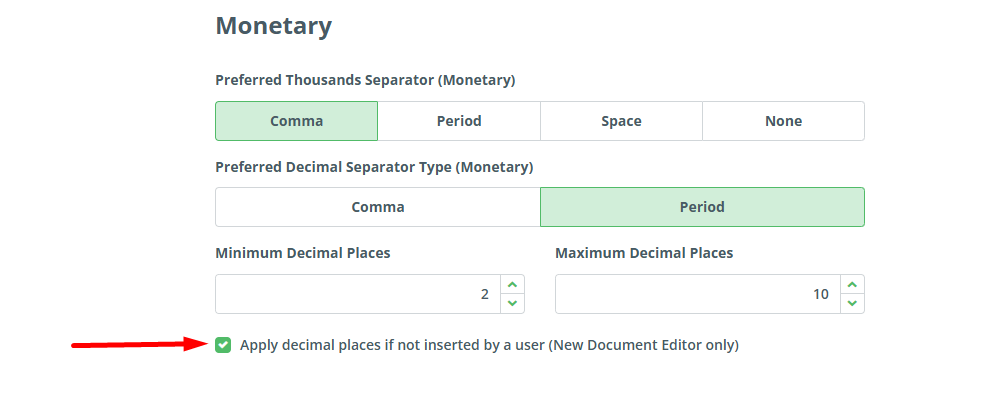
12) Optional Decimal Places for the Money Element
We have added an option to automatically add minimal decimal places to the Money element, if they are not already added by the user. This can be enabled in Settings – Document Localization.
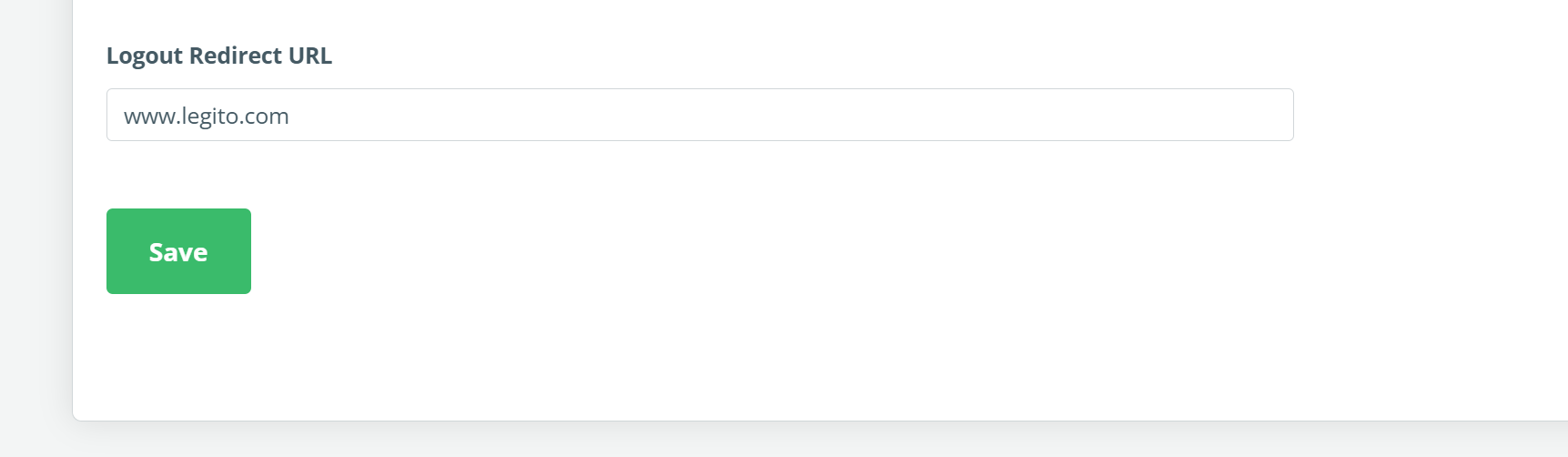
13) Custom Logout Web Page
Option to set up a URL to which a user will be redirected after logging out. This can be found in the General section of Workspace Settings.
14) Improved ChatGPT Integration
AI integration with Legito has been expanded. Users can now specify their custom name for their AI model. The name has to be assigned to one of the supported AI models.
15) Improved Pages in Document Editor
Visualization of pages in the Document Editor has been enhanced. This is the last beta version of pages before we release the first official version.
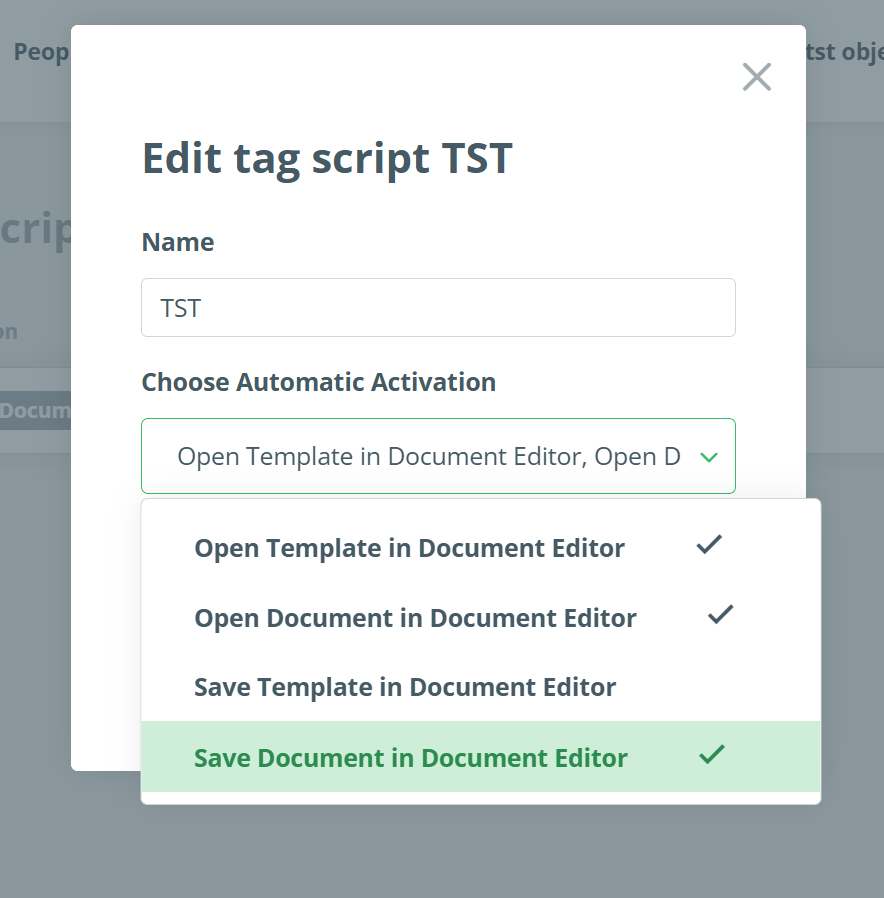
16) Automatic Triggers for Scripts
Now scripts can be triggered automatically by any of the following events:
- Open Template in Document Editor – script activates automatically when Template Suite is first opened in Document Editor
- Open Document in Document Editor – script activates whenever a Document is opened in Document Editor
- Save Template in Document Editor – script activates when the first draft of a Document is saved
- Save Document in Document Editor – script activates whenever a subsequent Document version is saved
There were no new features in Q3 2025 due to the migration of our current customers to the new version of our application.
Q4 2025: New Permissions and Triggers
1) New User Permissions and Sections
Several new user permissions have been added to control access to sections in the Workspace Settings, which were historically reserved for workspace admins only. New user permissions can be found in People -> Users -> Edit. The newly added permissions are for the following categories:
- Navigation
- Branding
- Footer
- Onboarding
- Workspace Localization
- Announcements
- Template & Documents Grouping
- Document Localization
- Document Records
- Document Anonymization
- Manage Documents
The User Permissions window has been redesigned for easier access to the following 5 new sections:
- Workspace Settings
- Document Export
- Document Automation
- Document Lifecycle Management
- Signatures
2) New Template Suites Permissions
Permissions for editing Template Suites are now divided into the following two options:
- Edit Template Suite – users can create documents and also edit and save templates, but are not allowed to publish new versions of Templates (the Publish button in the Template Editor is hidden).
- Edit and Publish Template Suite – the user can do everything described above, plus publish new versions of templates.
This change applies to individual templates, but also categories and countries.
3) Editable Rows in Templates Section
Similar to the dashboard, it is now possible to divide the Templates section into rows.
One or more Template Categories can be displayed in each Row. Each Row has a customizable title and layout (tiles or carousel).
Only one of the Templates section layouts can be applied for all users in the Workspace. Only the Workspace Admin can edit the layout.
To edit the layout, go to the Template section, click on the Actions button, and choose Edit item. Changes to Template section layout are saved automatically.
To add a new Row, click the “Add Row” button at the bottom of the page. Existing Row may be reordered or deleted.
Automatically simplified view for less than 10 Templates, and the Search view is not affected by this feature.
Filters are also applicable to the Rows.
The View for Templates not assigned to any Category, or are assigned to a Category that is not used in any Row will not change.
4) Clause Library Clause name is visible in the Template
Hovering over an added Clause Library Clause now displays its name. This is especially helpful when working with large templates containing multiple similar Clause Library Clauses.
5) Improvements to the Merging Template Updates
Merging a document with a new Template Suite Version also saves the user edit made before clicking the Merge button. The panel was also redesigned.
6) Additional Anonymization Options
Legito now supports the anonymization of several additional Template Suite elements and related Document Record data. When setting up anonymization, users can now select these options:
- Question Element
- Select Element
- Switcher Element
- Comments in the Document
- Conversation (chat) attached to the Document Record
- Document Record Properties
- Uploaded Files
7) Template Editor Tooltips
Tooltips have been added to show the full name of user-defined values, such as system names or options in questions and selects. These tooltips will appear in the Template Editor when hovering the cursor over items in conditions, repeats, default values, etc. This is especially useful for long texts.
8) Customizable Workflow Stage for Activation of Push API Connections
The existing Template Suite settings for activation of Push API connections are enhanced with Workflow Stages for each Template Suite. The Push API connection is triggered if a Document Record containing a Document from the Template Suite is in the selected Workflow Stages.
Document Records without automated Documents have one Workflow Stage setting in the Push API Connection details.
By default, all stages are active.
9) Deletion of Document Records from Archive
Trash was renamed Archive, and subsequently, the former Delete button is now Archive.
Also, we added the possibility of irretrievably deleting Document Records from Archive (formerly Trash). When deleted, the Document Record will be unavailable to the users, and such a data deletion will be done in the full scope of the Anonymization.
10) Automatic Delete and Archive for Document Records
Now you can set automatic deletion and automatic archiving of Document Records after a defined number of days since any of the following events
- Document Created
- Document Modified
- Document Last Active
- Document Archived (for deletion only)
The archiving and deleting are deactivated by default.
11) Customizable Defaults for View Tab in Document Editor
Customization was added to the View tab items in the Document Editor.
Each item in each Template Suite Layout can be configured separately. Users can now choose one of these three available options:
- Active
- Deactivated
- Hidden
The settings are available for Workspace admins only, and are located in the newly added Document Editor section in the Workspace Settings.
12) Optional Decimal Places for the Money Element
We have added an option to automatically add minimal decimal places to the Money element, if they are not already added by the user. This can be enabled in Settings – Document Localization.
13) Custom Logout Web Page
Option to set up a URL to which a user will be redirected after logging out. This can be found in the General section of Workspace Settings.
14) Improved ChatGPT Integration
AI integration with Legito has been expanded. Users can now specify their custom name for their AI model. The name has to be assigned to one of the supported AI models.
15) Improved Pages in Document Editor
Visualization of pages in the Document Editor has been enhanced. This is the last beta version of pages before we release the first official version.
16) Automatic Triggers for Scripts
Now scripts can be triggered automatically by any of the following events:
- Open Template in Document Editor – script activates automatically when Template Suite is first opened in Document Editor
- Open Document in Document Editor – script activates whenever a Document is opened in Document Editor
- Save Template in Document Editor – script activates when the first draft of a Document is saved
- Save Document in Document Editor – script activates whenever a subsequent Document version is saved
There were no new features in Q3 2025 due to the migration of our current customers to the new version of our application.
More From New Releases
Q3 2026: Smarter Kedy AI, Performance Improvements and More Real-Time Workspace
Discover smarter Kedy AI, faster document performance, real-time collaboration, and more in the latest Legito release.
...
Q2 2026: Features, Features, Features
Discover 31 new Legito features, including Kedy AI features and smarter workflows to boost document automation.
...
Q1 2026: Twenty New Features, AI Included
Discover 20 new Legito features, including AI-powered Word conversion and smarter workflows to boost document automation.
...
Q4 2025: New Permissions and Triggers
Q4 2025: Data Insights and other improvements to enhance automation, security, and document management in Legito.
...
Q2 2025: Data Insights and 11 other Improvements
Q2 2025: Data Insights and 11 other improvements to enhance automation, security and document management in Legito.
...
Q1 2025: AI for CLM and more
Discover what’s new in the Q1 2025: AI for CLM and other enhancements to make your document management faster and more efficient.
...
Q4 2024: Document Automation and Signatures
Discover new and improved Legito features in the Q4 2024 report: Document Automation and Signatures. More efficient automation and signatures!
...
Q3 2024: Next Generation Document Editor
Reflecting on a productive first quarter in 2024, we are delighted to announce the release of our latest features.
...
Q2 2024: Focus on CLM and Integrations
Reflecting on a productive first quarter in 2024, we are delighted to announce the release of our latest features.
...
Q1 2024: New Integrations, Search & Document Automation Features
Reflecting on a productive first quarter in 2024, we are delighted to announce the release of our latest features.
...
December 2023: Salesforce Integration And More
In our most recent release, our team launched a Legito app in Salesforce that supports all endpoints contained in Legito’s robust REST API. Addit...
November 2023: Zapier Integration & Dashboard Improvements
We redesigned the default Dashboard for newly created Workspaces. The new Dashboard design is based on your feedback and has been applied to the Wi...
October 2023 Release: Easier Forms Building And More
To allow our power users to quickly and easily build simple Form Templates in the Template Editor, we added a Quick Actions bar with pre-built bloc...
September 2023 Release: Localization & Template Editor Improvements
Discover new localization settings for workspace and other template editor improvements. Workspace admins can set formats of dates, numbers, and fi...
August 2023 Release: New Features for Power Users
Our latest release introduces Automatic Field Creation for Legito Sign and DocuSign within Legito Templates. And much more.
...
July 2023 Release: Enhanced Legito Sign & Free Workspace
As a Legito gesture to provide value to the Legito community, and to support new entrepreneurs, Legito offers a Free plan that provides access to s...
June 2023 Release: Processing PDF Forms
Legito can now process and automatically fill PDF documents using data inserted to your Legito Documents or Forms. To add a PDF Template to your Te...
May 2023 Release: Process Management Improvements
Now you can upload files to Object Records the same way as Document Records. We added a feature that allows the activation of Saved Files Property ...
April 2023 Release: UX & Integration Tools Improvements
We made several improvements in April, which led to a smoother and more enjoyable user experience. Keeping up with the latest advancements in UX an...
March 2023 Release: User Onboarding And More
In addition to Workspace Onboarding, we have released a simplified User Onboarding for non-Admin users. Workspace Onboarding will teach your power ...